
kadomu.online
Private sourceMVPA personalised gift website builder: choose a template, add stories and photos, and create a digital gift.
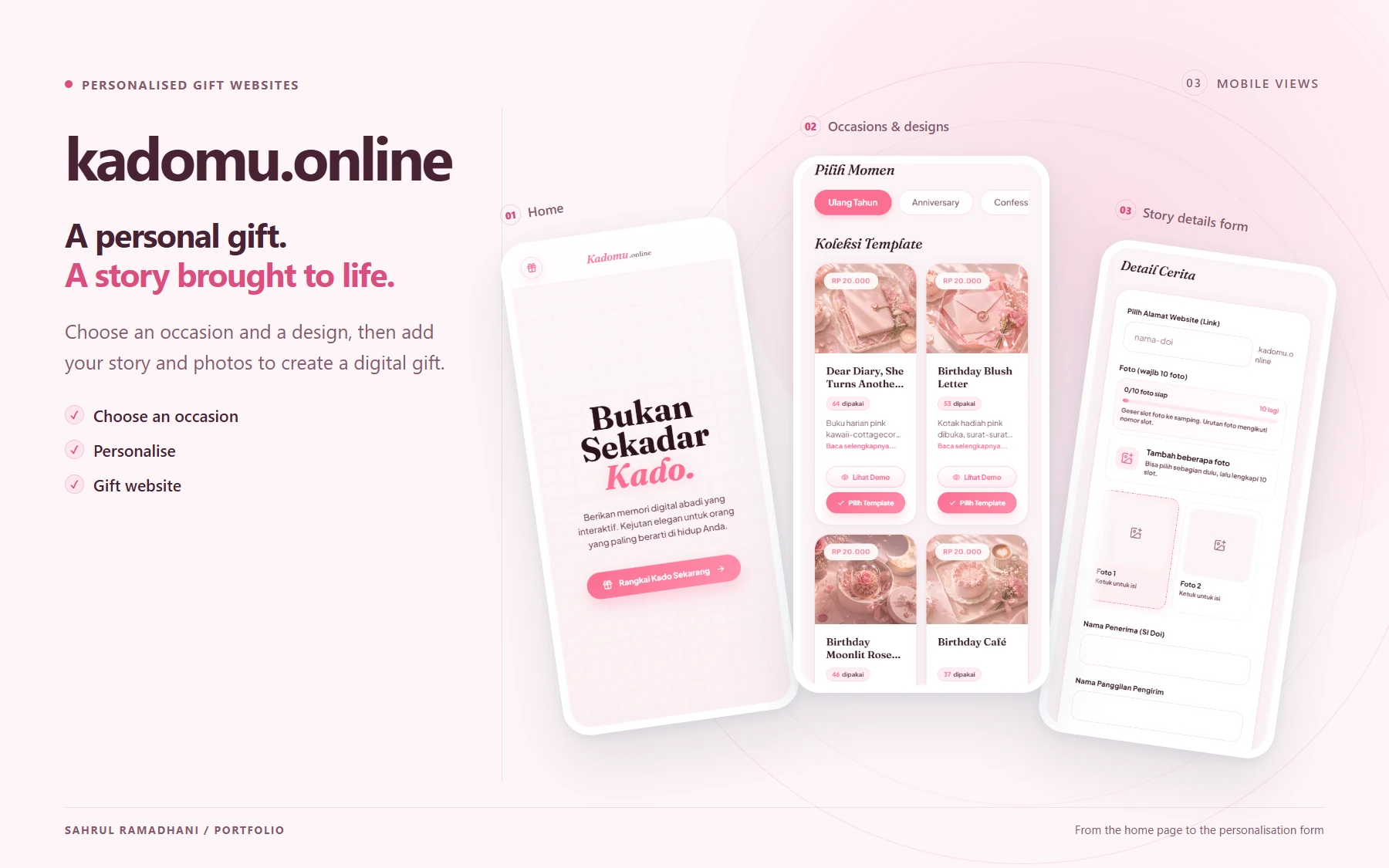
A personal gift. A story brought to life. Choose an occasion and a design, then add your story and photos to create a digital gift. From the home page to the personalisation form
My contribution highlights
- Worked on catalogue/previews, message/photo/music personalisation, template interactions, and reduced motion support.
- Added image content/type validation, Sharp optimisation, media management, QR assets, and slug/subdomain render payloads.
- Managed site lifetime, expiry/render cache, asset cleanup, and site deletion.
Contents · 8 contribution modules
Main workflow
6 stepsCustomers turn templates into personalised gift websites. Media validation, payments, and site lifetime determine when recipients can access the site.
01Design a personal gift
Choose a category and template
CustomerAdd content and media
Customer
02Validate and pay
Check the slug and images
Hono APICreate an order and invoice
Customer & Mayar provider
03Share the gift website
Render the personal site
System & recipientManage site lifetime
System & admin
Process details & branches
Choose a category and templateCustomer
Explore the catalogue, preview templates, and choose the gift’s appearance and duration package.
Add content and mediaCustomer
Enter stories, messages, recipient details, photos, or music according to the selected template’s content contract.
Check the slug and imagesHono API
Validate input and slug availability; inspect image files and optimise media before the site uses it.
Create an order and invoiceCustomer & Mayar provider
Orders connect to invoices. The backend checks callbacks/status and payment amounts.
Is the payment valid?
- Valid payment. Activate the site; repeated callbacks are handled to avoid repeat activation.
- Unpaid or not yet valid. The payment does not activate the site yet.
Render the personal siteSystem & recipient
Active site data is read through its slug/subdomain. The template displays personalised content and interactions for the recipient.
Manage site lifetimeSystem & admin
Access and render caching follow the site’s active period. Admins manage sites/orders; cleanup processes handle data and assets that need removal.
Site activation follows payment verification. Render payloads and caches are limited by site lifetime, with cleanup for related data and media.
About kadomu.online
kadomu.online is a personalised gift website builder. Customers choose a template, add messages and stories, upload photos or music, and receive a gift website with a slug/subdomain and an active period. An admin dashboard manages templates, packages, orders, and generated sites.
I built the customer app, admin app, API, and shared packages in a single monorepo. My work covers template experiences, payments, media processing, and the gift website lifecycle.
My contributions
Monorepo structure and shared contracts
I developed the customer app, admin app, Hono backend, and a shared package for cross-application data types. Shared contracts connect template inputs, orders, and site data so the frontend and API use compatible data structures. PostgreSQL and Drizzle handle storage schemas and migrations.
Catalogue, previews, and personalisation
I built category/template selection, previews, personalisation forms, order pages, and success pages. Customer content connects to template data contracts so messages, stories, recipient information, photos, and music can be used in the chosen gift website.
Template interactions and the recipient experience
I worked on template state, content opening, long-message disclosure, music controls, and interaction progress. I also handled reduced motion preferences. The template registry connects catalogue choices with the components and content requirements used when rendering a site.
Orders, Mayar payments, and activation
I developed input validation, slug checks/reservations, order creation, and the Mayar invoice integration. I checked callbacks, provider status, and payment amounts before site activation. Repeated callback handling helps prevent one payment from triggering multiple activations.
Media validation, optimisation, and delivery
I added image type and initial file content checks, Sharp optimisation, template media processing, and QR asset generation. Render payloads provide site data by slug/subdomain so personalised content can load through the correct template.
Site lifetime, render caching, and cleanup
I distinguished unpaid orders, active sites, and expired sites in application workflows. Render cache lifetime is bounded by the site’s active period. I worked on asset cleanup and site deletion to keep database records and media removal manageable together.
Admin dashboard, authentication, and deployment
I built management for categories, templates, duration packages, orders, sites, demos, and dashboards. Admin sessions use Argon2 hashes. I also prepared separate web, admin, and API services through Docker and Nginx configuration so each application’s requirements can be managed according to its role.
Template contracts and quality checks
I strengthened the relationship between interaction progress and template completion, added TypeScript AST checks, and developed an evidence validator tied to source fingerprints. I wrote callback, visibility, and completion progress tests for changes that can affect site activation and the gift recipient’s experience.
Fields & core technologies
Project fields
Core technologies
153 commits in the last 12 months
All branches| Nov | Dec | Jan | Feb | Mar | Apr | May | Jun | Jul | Aug | Sept | Oct | Nov | |||||||||||||||||||||||||||||||||||||||||
|---|---|---|---|---|---|---|---|---|---|---|---|---|---|---|---|---|---|---|---|---|---|---|---|---|---|---|---|---|---|---|---|---|---|---|---|---|---|---|---|---|---|---|---|---|---|---|---|---|---|---|---|---|---|
| Sunday | |||||||||||||||||||||||||||||||||||||||||||||||||||||
| Monday | |||||||||||||||||||||||||||||||||||||||||||||||||||||
| Tuesday | |||||||||||||||||||||||||||||||||||||||||||||||||||||
| Wednesday | |||||||||||||||||||||||||||||||||||||||||||||||||||||
| Thursday | |||||||||||||||||||||||||||||||||||||||||||||||||||||
| Friday | |||||||||||||||||||||||||||||||||||||||||||||||||||||
| Saturday |
How it is counted · 1 repo · 1 branch
My authored commits reachable from all remote branches at sync time. Each SHA is counted once, even across branches or forks. Merge commits are excluded. Dates use the author timestamp in Western Indonesia Time (UTC+7), rather than push time. The current streak remains active when the last commit was yesterday and today is still in progress.
This calendar covers commits across all branches. Its totals may differ from GitHub’s contribution calendar, which includes other activity types and follows its own branch rules. This calendar covers only the project you are viewing.
Contribution history
153 of my non-merge commits · All branches · Data as of 3 November 2026.