
SKN Superapp
Public sourceMVPAn HRIS MVP connecting location- and face-based attendance, leave, overtime, and payroll.
A team project developed for the 24-hour PLAY IT Hackathon competition.
3rd Place · Best Performance · Web Application
The SKN Superapp team won 3rd Place for Best Performance in the Web Application category at the 24-hour PLAY IT Hackathon.
View the team and award photo

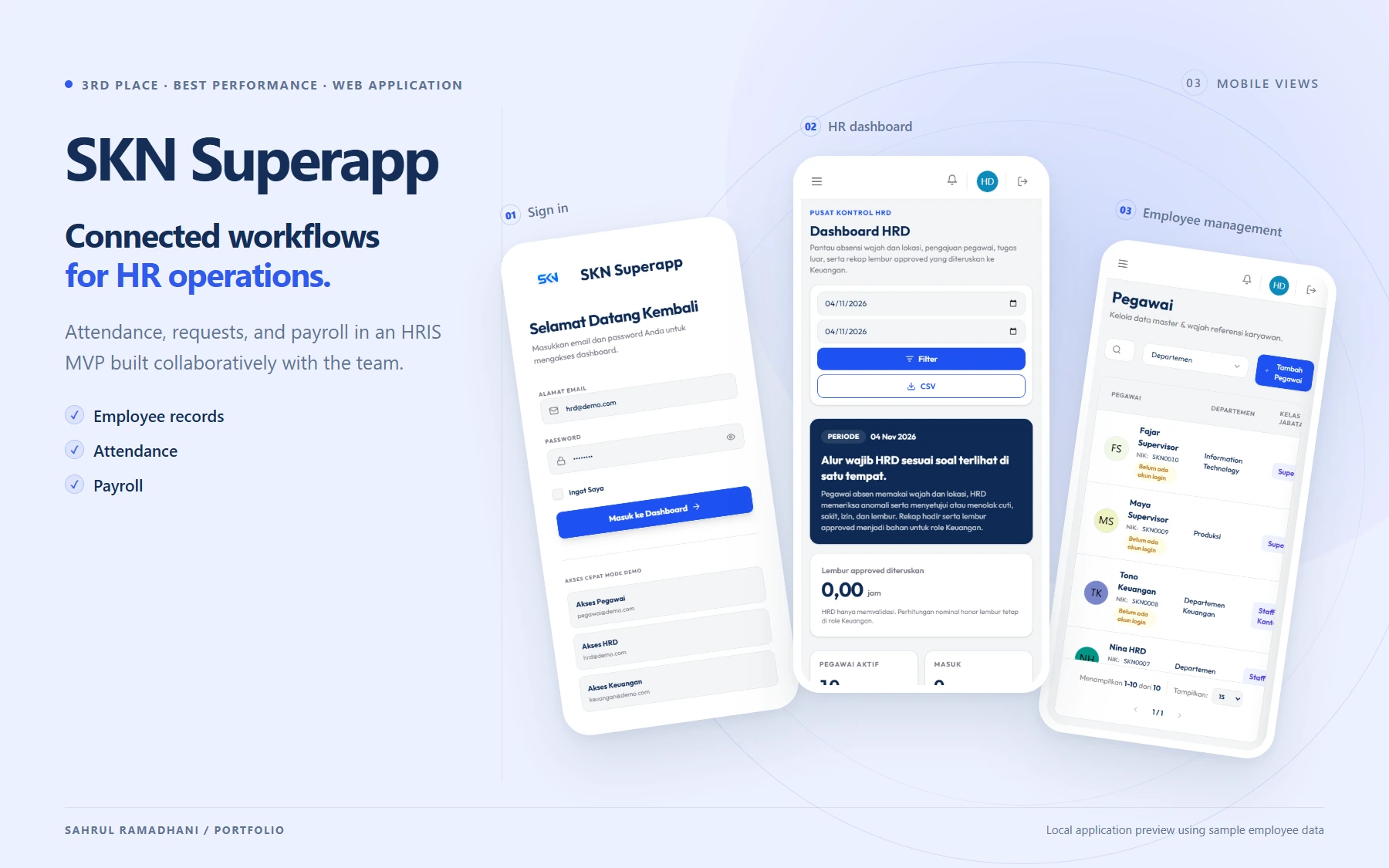
Connected workflows for HR operations. Attendance, requests, and payroll in an HRIS MVP built collaboratively with the team. Local application preview using sample employee data
My contribution highlights
- Integrated check-in/check-out with location, geofence radius, off-site assignments, lateness, and anomaly statuses.
- Connected face references and the face recognition service, handling timeouts, similarity results, and threshold normalisation.
- Combined base salary, allowances, approved overtime, and deductions into take-home pay with component breakdowns.
Contents · 8 contribution modules
Main workflow
6 stepsEmployee and work location data underpin attendance verification. Reviewed attendance and requests then feed into payroll calculations.
01Prepare work data
Set up employees and organisation
HR & adminPrepare attendance references
Employee & system
02Record and review attendance
Check in / check out
Employee & face serviceReview requests and corrections
Employee & HR
03Calculate and finalise payroll
Generate for a period
Finance & payroll serviceFinalise and issue payslips
Finance & employee
Process details & branches
Set up employees and organisationHR & admin
Manage employees, departments, positions, work locations, salary components, and role-based access.
Prepare attendance referencesEmployee & system
Location/geofence data and face references are required to check attendance in the correct context.
Check in / check outEmployee & face service
The system checks location, work radius, face similarity, time, and attendance or off-site assignment status.
What is the verification result?
- Requirements met. Attendance is saved with the resulting status and timestamp.
- Issue or anomaly. An issue message or anomaly status is shown; corrections follow the available workflow.
Review requests and correctionsEmployee & HR
Leave, overtime, and attendance corrections are reviewed by the relevant role. Approved overtime feeds into payroll.
Generate for a periodFinance & payroll service
Calculate base salary, allowances, approved overtime, lateness, and deductions into a take-home pay breakdown.
Finalise and issue payslipsFinance & employee
Payroll details and status history are stored. Results can be exported and payslips issued as PDFs.
Payroll connects employee records, attendance, approved overtime, allowances, and deductions. The product was developed as an HRIS MVP.
About SKN Superapp
SKN Superapp is an HRIS MVP for employees, HR, finance, and admins. It connects organisational data with location- and face-based attendance, leave/overtime requests, attendance corrections, assignments, payroll, and payslips. Each role has pages and workflows suited to its needs.
Within the development team, I handled the database structure, HRIS backend, attendance verification integration, payroll calculations, and employee, HR, and finance pages.
My contributions
Database structure and relationships between modules
I built schemas, migrations, and models for employees, departments, positions, work locations, attendance, requests, salary components, and payroll periods. I also prepared storage for deduction breakdowns, overtime, status history, and audit logs. These relationships let attendance, request, and payroll modules use connected employee information.
Master data backend and HR workflows
I worked on controllers for employees, departments, positions, users, and work locations. I also connected announcements, assignments, attendance corrections, and request verification to HR pages. Controller and form improvements allow data changes and request decisions to flow into the related application processes.
Check-in/check-out and geofencing
I developed attendance workflows that check an employee’s position against their work location and geofence radius. The process also connects attendance time, lateness, and off-site assignments to attendance status. I improved location configuration and messages when a location or required information does not meet attendance rules.
Face recognition integration
I built an HTTP connector to the face recognition service to send images and read similarity results. I handled missing face references, service timeouts, and threshold normalisation for fractional or percentage values. Verification results feed into attendance decisions and anomaly status records.
Payroll component calculations
I developed a payroll service combining base salary, allowances, approved overtime, lateness, and deductions into take-home pay. I separated overtime and deduction breakdowns so calculations can be traced by component, then connected them to the selected employee and payroll period.
Payroll generation, finalisation, and history
I worked on payroll generation and finalisation, including status change records. I also connected calculation outputs to PDF payslips and spreadsheet exports. This workflow lets finance move from component and attendance data to payroll details and the resulting documents.
Employee pages and attendance workflows
I developed and connected employee dashboards, profiles, and attendance pages to controllers and application data. I improved mobile layouts, forms, and verification failure messages so employees can understand check-in/check-out results and issues that need attention.
Finance pages and payroll management
I worked on the finance dashboard, salary components, deduction rates, attendance summaries, and payroll pages. I connected them to backend services and improved location/geofence management and HR processes that feed payroll. My focus was bringing data, calculations, and screens together into a usable HRIS workflow.
Fields & core technologies
Project fields
Core technologies
11 commits in the last 12 months
All branches| Nov | Dec | Jan | Feb | Mar | Apr | May | Jun | Jul | Aug | Sept | Oct | Nov | |||||||||||||||||||||||||||||||||||||||||
|---|---|---|---|---|---|---|---|---|---|---|---|---|---|---|---|---|---|---|---|---|---|---|---|---|---|---|---|---|---|---|---|---|---|---|---|---|---|---|---|---|---|---|---|---|---|---|---|---|---|---|---|---|---|
| Sunday | |||||||||||||||||||||||||||||||||||||||||||||||||||||
| Monday | |||||||||||||||||||||||||||||||||||||||||||||||||||||
| Tuesday | |||||||||||||||||||||||||||||||||||||||||||||||||||||
| Wednesday | |||||||||||||||||||||||||||||||||||||||||||||||||||||
| Thursday | |||||||||||||||||||||||||||||||||||||||||||||||||||||
| Friday | |||||||||||||||||||||||||||||||||||||||||||||||||||||
| Saturday |
How it is counted · 1 repo · 9 branch
My authored commits reachable from all remote branches at sync time. Each SHA is counted once, even across branches or forks. Merge commits are excluded. Dates use the author timestamp in Western Indonesia Time (UTC+7), rather than push time. The current streak remains active when the last commit was yesterday and today is still in progress.
This calendar covers commits across all branches. Its totals may differ from GitHub’s contribution calendar, which includes other activity types and follows its own branch rules. This calendar covers only the project you are viewing.
Contribution history
11 of my non-merge commits · All branches · Data as of 3 November 2026.